
Key takeaways
- Citation generators arrange the details you give them; most wrong citations come from wrong or missing inputs rather than from the formatting engine.
- The errors cluster in six places: dropped or reversed authors, title capitalisation, dates and n.d., italics lost on copy, the wrong source type, and an outdated edition.
- A DOI is the most reliable auto-fill source, an ISBN next, and a URL last, because web pages often expose no author or date in their metadata.
- Run a six-question check on each citation against the source, and fix fields in the generator rather than editing the pasted text.
A citation generator does one thing: it takes the details you give it and arranges them in the order and punctuation a style guide requires. When the details are right, the citation is right. Most wrong citations come from wrong or missing details going in, and the rest come from a few formatting rules that generators handle inconsistently. University library guides say the same thing in different words: treat the output as a draft and check it.
This guide lists the six places errors cluster, why they happen, and a check you can run in about a minute per source.
1. Authors dropped or mangled
This is the most damaging error, because it changes who is credited. It happens in two ways. Auto-fill from a web page pulls the first byline it finds and misses co-authors, or picks up a site name as the author. And a name typed in the wrong order comes out as the wrong person: "Smith John" entered where the generator expects "John Smith" produces "John, S." in APA.
Check: count the authors on the source and count them in the citation. Make sure each one reads Last, Initial (APA) or Last, First (MLA) and that the order matches the source. APA 7 lists up to 20 authors in full; MLA 9 lists the first author and "et al." when there are three or more. Our APA citation generator asks for names in First Last order and formats them to Last, F. M. with an ampersand before the final author; if you type them the other way round, the initials will be wrong.
2. Capitalisation of titles
APA uses sentence case for article and web page titles (only the first word, proper nouns and the word after a colon are capitalised) and MLA uses title case. Many sources publish titles in title case, so an APA citation pasted straight from a page is often wrong, and a generator that does not convert the case passes the error through.
Check: in APA, lower-case every word in the article title except the first word, proper nouns and the first word after a colon. Journal and book titles keep their capitals. In MLA, capitalise the main words. The generator keeps the article title as you typed it, so this one is on you.
3. Dates: year, n.d. and retrieved dates
Web pages often have no visible date, and a generator fed nothing will either drop the year, invent one from the copyright line in the footer, or correctly print "n.d.". A retrieval date is only required in APA 7 for pages that are designed to change, such as a dictionary entry or a live statistics page.
Check: the year matches the publication date on the source, not the site's copyright year. If there is no date, the citation should read "n.d.". Only add "Retrieved Month Day, Year, from" when the page content changes over time.
4. Italics lost in the copy
The container title (the journal, book or website) is italicised in APA and MLA; the article title is not. Generators get this right on screen and then lose it in transit, because plain-text copy strips italics. The citation lands in Word with nothing italicised, and the error is invisible until a marker looks.
Check: after pasting, look for the italics. If the copy button offers rich text, use it; the generators on this site copy with the italics preserved so Word and Google Docs keep them. If you copied plain text, add the italics by hand.
5. The container and source type
A journal article cited as a web page loses its volume, issue and page numbers. A book chapter cited as a book credits the chapter author with the whole book. Auto-fill from a URL can only see what the page exposes, so a PDF on a repository often fills in as a generic web page.
Check: pick the right source type first (website, book, journal, magazine, newspaper, chapter, video), then fill in the fields that type needs. A DOI is the most reliable auto-fill for journal articles; our generator looks it up on Crossref, an ISBN on Open Library, and a URL from the page's own metadata, in that order of reliability.
6. The wrong edition
APA 6 and APA 7 differ in several visible ways: APA 7 drops the publisher location, lists up to 20 authors instead of 7, and no longer writes "Retrieved from" before most URLs. MLA 8 and MLA 9 are closer, but older tools still produce MLA 7 with "Web." and access dates. A generator stuck on an old edition produces citations that look right and are marked wrong.
Check: the tool says which edition it follows. The APA and MLA generators on The Tools Kit state APA 7 and MLA 9 on their pages; if a tool does not name its edition, assume it may be old.
The 60-second check
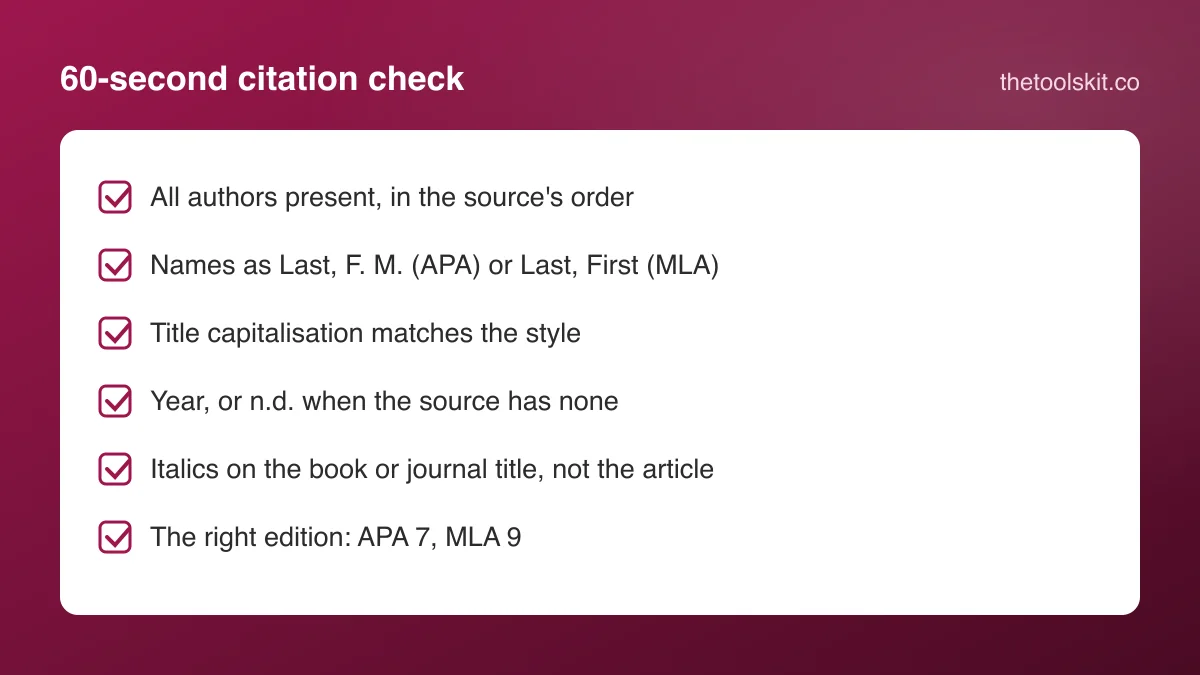
For each citation, read it once against the source with these six questions:
- Are all the authors there, in the source's order, as Last, Initial or Last, First?
- Is the article title in the case the style wants?
- Is the year the publication year, or n.d. if there is none?
- Is the container title in italics after pasting?
- Is the source type right, with volume, issue and pages for a journal article?
- Is this the current edition of the style?
If a citation fails a question, fix the field in the generator rather than editing the pasted text, so the in-text citation and the reference entry stay consistent. Our guides to citing a website in APA 7 and the MLA 9 works cited page show what a correct entry looks like for the most common source types.
When to skip the generator
For a government report, a legal case, a dataset or a conference paper, the field mapping in most generators is loose and the style manual's own example is faster to follow. For a reference list of fifty journal articles with DOIs, a generator with DOI lookup is faster and more accurate than typing, provided you run the six checks on the output.
Frequently asked questions
They are accurate at arranging correct details into the style's order and punctuation. The errors come from wrong or missing inputs, such as dropped co-authors, titles in the wrong case, a copyright year used as the publication date, and italics lost when copying as plain text. Check each citation against the source before submitting.
APA uses sentence case for article and web page titles, while most sources and MLA use title case. A generator that keeps the title as typed passes the source's capitalisation through. In APA, lower-case every word in the article title except the first word, proper nouns and the first word after a colon.
Plain-text copying strips formatting, so the italics on the journal, book or website title are lost. Use a copy option that preserves rich text, or add the italics by hand after pasting. The container title is italicised in APA and MLA; the article title is not.
A DOI, because it resolves to a registry record with the authors, title, journal, volume, issue, pages and date. An ISBN gives reliable book data. A URL depends on what the page exposes in its metadata, so author and date are often missing and need to be typed in.