
Key takeaways
- The first digit of an HTTP status code says whose problem it is: 4xx means something in the request, 5xx means the server failed on a valid request.
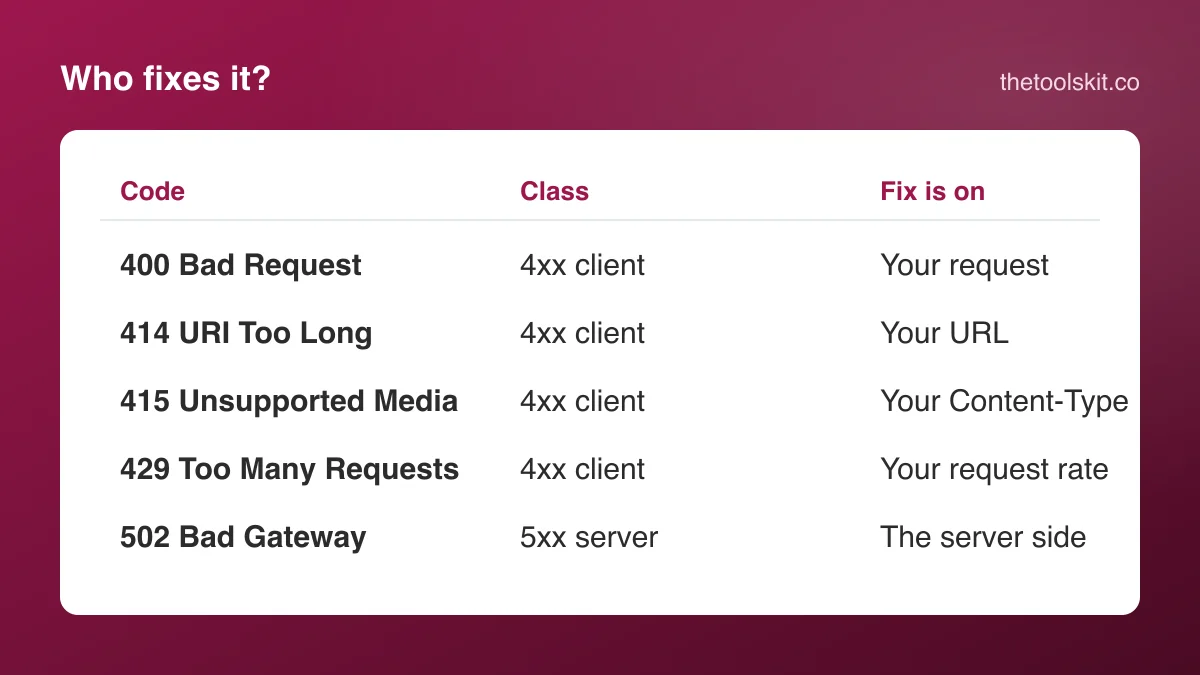
- 400, 414, 415 and 429 are all client errors fixed by changing the request: its body, its URL length, its Content-Type header or its rate.
- 502 Bad Gateway means a proxy could not get a valid answer from the server behind it; visitors can only wait and retry.
- The status code is the headline; the response body and the request ID in the headers say exactly which field or limit failed.
An HTTP status code is three digits, and the first digit says whose problem it is. A 4xx code means the server understood that something in the request was wrong: the format, the URL, the headers, the rate. A 5xx code means the request was fine and the server failed to answer it. So a 400 is not a 5xx error, whatever a search box suggests; it is the most general client error there is.
This guide takes the five codes people look up most, 400, 414, 415, 429 and 502, and for each one gives the meaning, the usual cause, and whether the fix is on your side or the server's. The one-line definitions are the same as on our HTTP status code reference, which also covers the codes not listed here.
The first digit
| Class | Meaning | Whose fix |
|---|---|---|
| 2xx | Success; the request was received and handled | Nobody's |
| 3xx | Redirection; the resource is somewhere else | Follow it |
| 4xx | Client error; something in the request | Yours |
| 5xx | Server error; the request was valid, the server failed | The server's |
If you are a visitor seeing one of these in a browser, a 4xx usually means retrying the same thing will not help, and a 5xx usually means it will, after a short wait. If you are a developer calling an API, a 4xx means read the response body and your own request before anything else.
400 Bad Request
Meaning. The server cannot process the request because of a client error: malformed syntax, invalid request framing, or deceptive routing. It is the catch-all 4xx; when a server has no more specific code to give, it gives this one.
Usual causes. Malformed JSON in a request body, missing required parameters, oversized cookies, or invalid characters in the URL. In a browser, a stale or oversized cookie for the site is the most common trigger.
Fix. For an API call, check the request body and parameters against the API's documentation for correct formatting and required fields; running the body through a JSON formatter finds a missing comma or an unquoted key in seconds, and the URL encoder fixes characters that are not allowed raw in a URL. In a browser, clearing the site's cookies often helps. Full page: 400 Bad Request.
414 URI Too Long
Meaning. The URI requested by the client is longer than the server is willing to interpret. Servers set their own limits; a few thousand characters is a common ceiling.
Usual causes. Passing too much data in a GET request's query string instead of a POST body, or a redirect loop that keeps lengthening the URL by appending parameters on every hop.
Fix. Shorten the URL, or switch to a POST request with the data in the body instead of the query string. If the URL grew on its own, look for the redirect loop. The URL decoder makes a long encoded query string readable so you can see what is in it. Full page: 414 URI Too Long.
415 Unsupported Media Type
Meaning. The server refuses the request because the payload format, declared by the Content-Type header, is not one it supports.
Usual causes. Sending XML to an endpoint that expects JSON, or omitting or mismatching the Content-Type header, for example posting a JSON body with the default form content type. File uploads trigger it when the server accepts JPG and PNG and receives something else.
Fix. Set the correct Content-Type header, such as application/json, matching the format of your request body. For an upload, convert the file to a format the server lists; an iPhone photo that fails is usually HEIC, and the HEIC to JPG converter or the image format converter produces an accepted file. Full page: 415 Unsupported Media Type.
429 Too Many Requests
Meaning. The client has sent too many requests in a given time period. This is rate limiting, and it is a client error because the limit is published and the client exceeded it.
Usual causes. Exceeding an API's rate limit by sending requests too frequently, often from a loop without a delay, a retry storm after another error, or several processes sharing one API key.
Fix. Slow down. Check the response's Retry-After header for how long to wait before retrying, and back off exponentially if the header is missing. Cache responses you request repeatedly. Full page: 429 Too Many Requests.
502 Bad Gateway
Meaning. A server acting as a gateway or proxy received an invalid response from the upstream server it was trying to reach. The request was fine; the chain behind the front door broke.
Usual causes. A backend server crashed, is overloaded or restarted, or there is a proxy or load-balancer configuration problem between it and the client. Deployments are a common moment for a 502, when the old process is gone and the new one is not yet listening.
Fix. As a visitor, retry the request after a short wait; nothing you change in the request will help. If you run the server, check the backend's logs and health, and the proxy or load-balancer configuration. Full page: 502 Bad Gateway.
Telling them apart quickly
- The request itself is wrong: 400. Start with the body and the parameters.
- The URL is the problem: 414. Move data out of the query string.
- The format header is the problem: 415. Fix Content-Type or convert the file.
- You are being throttled: 429. Wait for Retry-After.
- The server's own back end failed: 502. Wait and retry; nothing to fix on your side unless you operate it.
Two codes often confused with these: 422 Unprocessable Content is a well-formed request whose contents fail validation (the JSON parsed, but a field is wrong), and 504 Gateway Timeout is a 502's cousin where the upstream did not answer at all within the time limit.
Reading a code in the wild
The status code is only the headline. Most APIs put a human-readable error in the response body with the exact field or limit that failed, and most proxies put a request ID in a header that the operator can search for in logs. Read both before changing anything. Browser developer tools show the status and the body under the Network tab; for a command-line check, a request with verbose output prints the status line and every header.
Frequently asked questions
No. A 400 Bad Request is a 4xx client error, which means the server found something wrong with the request itself, such as malformed JSON, a missing parameter or an oversized cookie. 5xx codes mean the request was valid and the server failed to answer it.
For an API call, check the request body and parameters against the documentation, and validate any JSON body with a formatter to catch syntax errors. In a browser, clear the site's cookies, since an oversized or stale cookie is the most common cause of a 400 on an ordinary page.
The server does not accept the format declared in the Content-Type header, or the header is missing or mismatched. Typical cases are posting JSON with a form content type, sending XML to a JSON endpoint, or uploading a file type the server does not list, such as a HEIC photo to a JPG-only form.
Usually not. A 502 means a proxy or load balancer got an invalid response from the server behind it, so the problem is on the server side. Wait a short while and retry. If you operate the server, check the backend's logs and health and the proxy configuration.