
Key takeaways
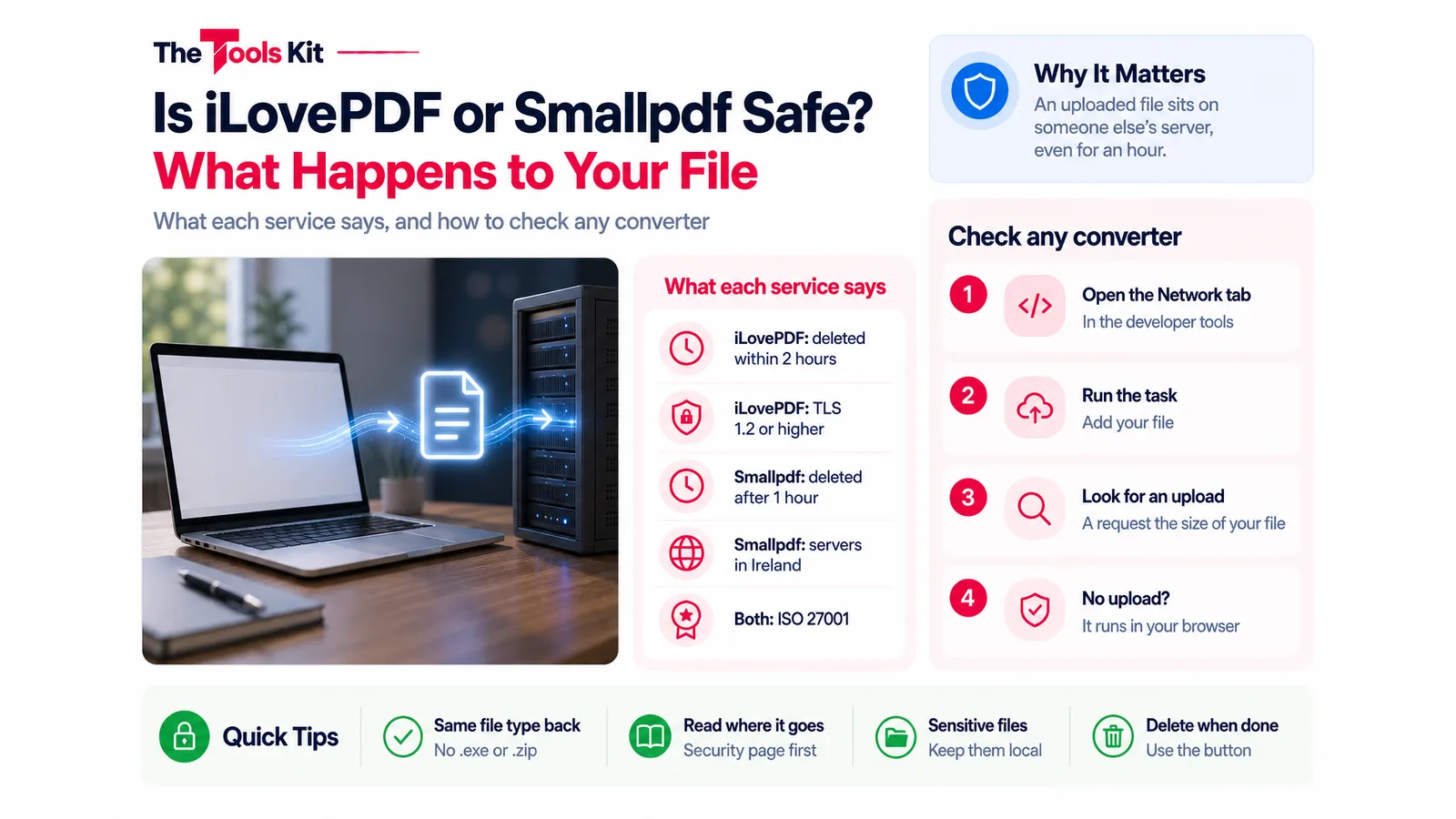
- iLovePDF and Smallpdf both upload your file to their servers, encrypt it in transit, and say they delete it automatically within two hours or one hour.
- Both companies report ISO/IEC 27001 certification, but that audits their security system; nobody outside can verify what happens to a single file.
- The FBI warned in March 2025 that unknown free converters can plant malware in returned files and scrape personal data, so avoid unfamiliar sites.
- The browser's Network tab shows whether any tool uploads your file; for passports, tax forms or medical records, use a tool that runs locally.
iLovePDF and Smallpdf are established services that publish their security practices, and by their own account both encrypt your file in transit, process it on their servers and delete it automatically within a few hours. Whether that is safe enough depends on the file. For a menu or a flyer it is a non-issue. For a passport scan, a medical record or a signed contract, the question is whether you want a copy on someone else's server at all, even for an hour.
This guide sets out what each service states on its own pages, what uploading actually means, and how to check any converter yourself.
What "upload" means
Most online PDF tools work in three steps: your browser sends the file to the company's server, the server converts or compresses it, and you download the result. For that hour or two, a copy of your file exists on hardware you do not control, under the company's policies and the laws of the country where the server sits.
A second kind of tool does the work inside your browser. The page loads a program, the program processes the file on your own device, and the file never leaves it. Both kinds look the same on screen, which is why the check further down is worth two minutes.
Is iLovePDF safe?
On its security page (read 26 November 2026), iLovePDF says your file travels encrypted to its servers, which are in the European Economic Area by default, and that users outside the EEA may be processed closer to them. It states encryption at rest with AES-256 and in transit with TLS 1.2 or higher, and that the original and the result are deleted automatically within 2 hours, with a "Delete now" button on the download page for sooner removal. It says no person opens files during processing, with signed documents as an exception handled under strict staff controls, and that it has held ISO/IEC 27001 certification since November 2020.
Is Smallpdf safe?
Smallpdf's own guide to its security (read 26 November 2026) says files are encrypted with TLS during transfer, processed on servers in Ireland under EU data law, and permanently removed after one hour for its free tools. Files you choose to keep in a Smallpdf account stay until you delete them, and are then removed within an hour. Its Trust Center lists ISO/IEC 27001 certification and compliance with GDPR, CCPA and the Swiss nFADP.

These are the companies' own statements. An ISO 27001 certificate means an auditor has checked their security management system; it does not let anyone outside verify what happens to one particular file.
The bigger risk is the converter you have never heard of
In March 2025 the FBI Denver Field Office warned that criminals use free online document converters to load malware onto victims' computers. The FBI says these tools often do the conversion they promise, but the resulting file can contain hidden malware, and the tools can scrape submitted files for identity numbers, banking details, email addresses and passwords. It advises keeping antivirus software up to date and scanning any file you receive before opening it.
So the practical rule is less about two big names and more about the unknown site that came up in a search result. Before you use any converter:
- Expect the same file type back. A PDF to Word tool should give you a .docx. If it hands you an .exe, .zip or an installer, delete it.
- Read where the file goes. A trustworthy service says on a security or privacy page where files are processed and when they are deleted. No page, no upload.
- Keep sensitive files local. For identity documents, tax forms or medical records, use a tool that runs in your browser, or desktop software you already trust.
- Delete when done. If the service has a delete button, use it rather than waiting for automatic removal.
How to check whether a tool uploads your file
You can see this yourself in Chrome, Edge or Firefox:
- Open the tool's page, then open the developer tools (F12, or Cmd+Option+I on a Mac) and pick the Network tab.
- Add your file and run the task.
- Watch the list of requests. An upload shows up as a request, usually a POST, whose size is close to your file's size, sent to the company's domain. A tool that works in the browser shows no such request; you only see the page's own scripts and any analytics.
This is the same check anyone can run on our tools. Most PDF and image tools on this site, such as Merge PDF, Compress PDF and JPG to PDF, run in your browser. The exception is the standard mode of PDF to Word, which sends the file to our server, and each tool says above it which way it works. Page visits on this site are measured with analytics, which our privacy policy lists.
For more on getting a file under an upload limit, see how to compress a PDF to under 1 MB, 2 MB or 5 MB, and for merging, how to combine multiple PDFs into one file.
Sources
Frequently asked questions
iLovePDF says files are encrypted in transit and at rest, processed on servers in the European Economic Area by default, and deleted automatically within 2 hours, and it holds ISO/IEC 27001 certification. Your file is still uploaded, so keep highly sensitive documents on your own device.
Smallpdf says files processed with its free tools are permanently removed from its servers after one hour. Files you save in a Smallpdf account stay until you delete them, and are removed within an hour of the deletion request.
Some are. In March 2025 the FBI Denver Field Office warned that criminals use free converters to plant malware in the returned file and to scrape personal data from uploads. Use services that publish their security practices, and delete any result that is not the file type you asked for.
Open the browser's developer tools, choose the Network tab, then run the task. An upload appears as a request about the size of your file sent to the company's server. A tool that works in your browser shows no such request.