
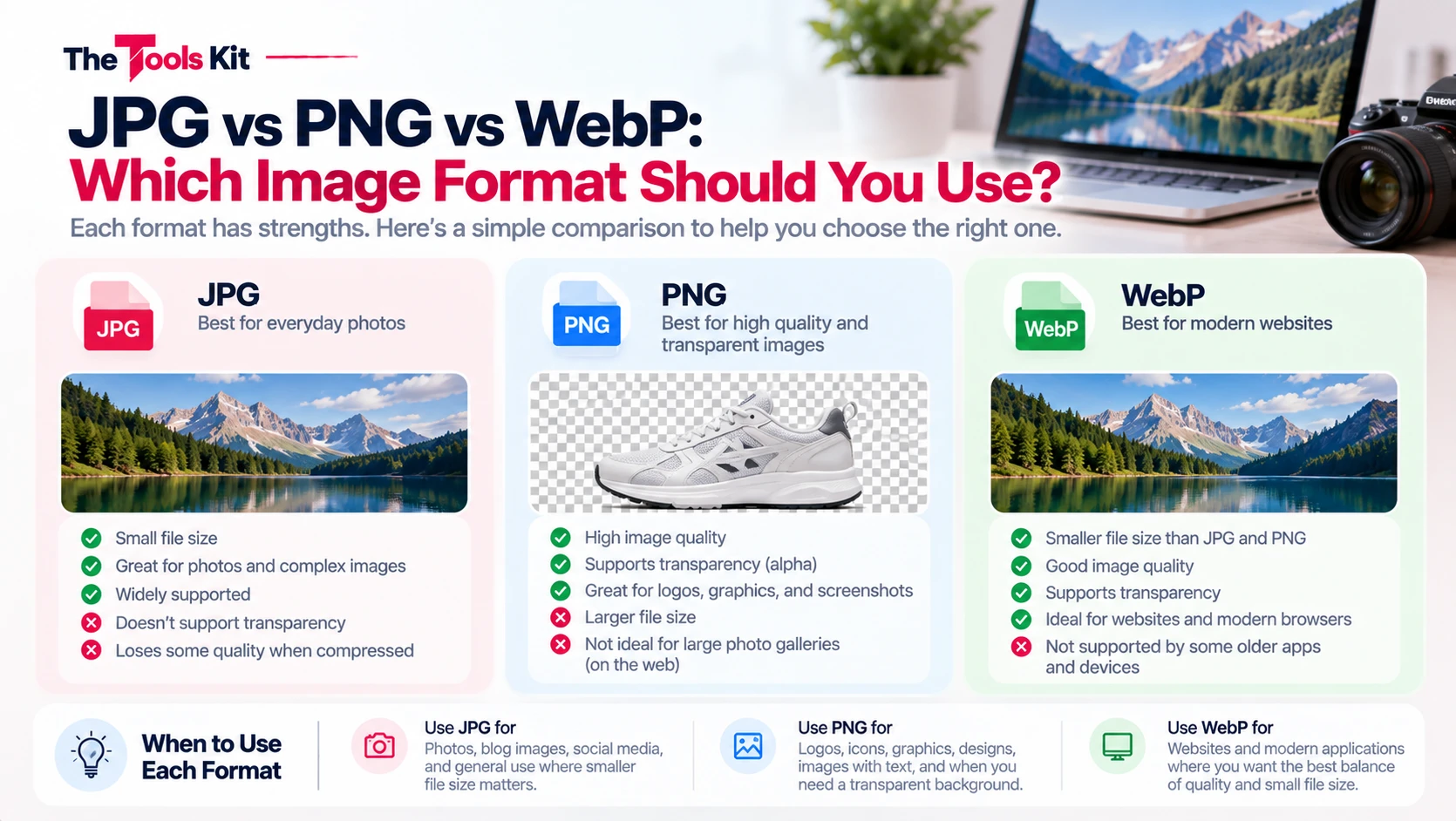
Key takeaways
- Photographs belong in JPG, logos, icons, screenshots and anything transparent belong in PNG, and images on your own website belong in WebP.
- JPG loss is cumulative, so each edit-and-save cycle degrades quality; keep a lossless master copy in PNG for repeated editing.
- Saving photographs as PNG is the most common cause of needlessly huge image files, producing files five to ten times larger than JPG.
- WebP beats JPG on size and supports transparency, but email clients, older design software, print workflows and many upload forms still reject it.
Choosing an image format sounds like a technical decision, but in practice it reduces to three questions: is the image a photograph, does it need transparency, and does anything old have to open it. Answer those and the format picks itself.
The short answer
- Photographs go in JPG, or WebP if you control where they will be viewed.
- Logos, icons, screenshots, and anything with transparency go in PNG.
- Images on your own website go in WebP, with a JPG or PNG fallback if you support old browsers.
JPG: lossy, and that is the point
JPG throws data away. Every time you save a JPG, the encoder discards detail it judges your eye will not miss, which is why a 4MB camera photo becomes a 400KB file that still looks fine.
That trade is excellent for photographs, where subtle gradations of colour hide the loss. It is bad for anything with hard edges. Save a screenshot of text as JPG and you will see fuzzy halos around the letters, because sharp black on white transitions are exactly what JPG compression handles worst.
JPG also has no transparency. There is no way to make part of a JPG see through to the background. If you need that, JPG is out.
One more property that catches people: JPG loss is cumulative. Open a JPG, edit it, save it, repeat, and quality degrades each time. Keep an original in a lossless format if you expect to edit repeatedly.
PNG: lossless, with an alpha channel
PNG never discards data. Save and resave as often as you like and the pixels are identical every time. It also supports full alpha transparency, so a logo can sit cleanly on any background colour.
The cost is size. For a photograph, a PNG can be five to ten times larger than the same image as JPG, because lossless compression cannot exploit the tolerance for loss that makes JPG so efficient. Saving photographs as PNG is the single most common cause of needlessly huge image files. If you have a PNG photo that will not fit an upload limit, converting it with PNG to JPG usually solves the problem in one step.
Where PNG earns its size: logos, icons, diagrams, screenshots, charts, and anything with flat colour areas and sharp edges.
WebP: the modern compromise
WebP does both jobs. It has a lossy mode that beats JPG on file size at comparable quality, and a lossless mode with transparency support like PNG. For images you serve on your own website, WebP is generally the right default, and it is why most image optimisation advice now points at it.
The catch is not browser support, which is broad now, but everything outside the browser. Email clients, older design software, some print workflows, and plenty of upload forms still do not accept WebP. If someone else has to open the file, or a form has to accept it, send JPG or PNG.
You can move between all three with the Image Format Converter, or use the direct JPG to PNG and PNG to JPG tools.
What about transparency you cannot see
A subtle trap: converting a transparent PNG to JPG does not preserve transparency, and it does not warn you either. The transparent areas get filled, usually with black or white. If your logo suddenly has a white box around it, this is why. Keep transparent assets in PNG or WebP.
A decision table
| Situation | Use |
|---|---|
| Camera photo, sharing or uploading | JPG |
| Camera photo, on your own site | WebP |
| Logo or icon with transparency | PNG or WebP |
| Screenshot with text | PNG |
| Master copy you will keep editing | PNG |
| Anything going into email or print | JPG or PNG |
The bottom line
JPG trades detail for size and does it well on photographs. PNG keeps every pixel and supports transparency, which matters for graphics and costs you on photos. WebP does both better but is not universally accepted outside browsers. Match the format to the content and to who has to open it, and you will not go far wrong.
Frequently asked questions
Neither is better overall, they are for different content. JPG is better for photographs because its lossy compression produces much smaller files with little visible loss. PNG is better for logos, screenshots, and anything needing transparency, because it keeps every pixel exactly.
PNG is lossless, meaning it stores every pixel exactly rather than discarding detail. For photographs this can make a PNG five to ten times larger than the same image as JPG. Saving photos as PNG is the most common cause of unnecessarily large image files.
For images on your own website, yes. WebP produces smaller files than JPG at comparable quality and supports transparency like PNG. Avoid it when someone else has to open the file, since email clients, older software, and many upload forms still do not accept WebP.
Yes, and usually without warning. JPG has no transparency support at all, so transparent areas get filled with a solid colour, typically black or white. Keep transparent assets as PNG or WebP.
Yes. JPG loss is cumulative, so each save discards a little more detail. If you expect to edit an image repeatedly, keep your master copy in a lossless format like PNG and export to JPG only at the end.