
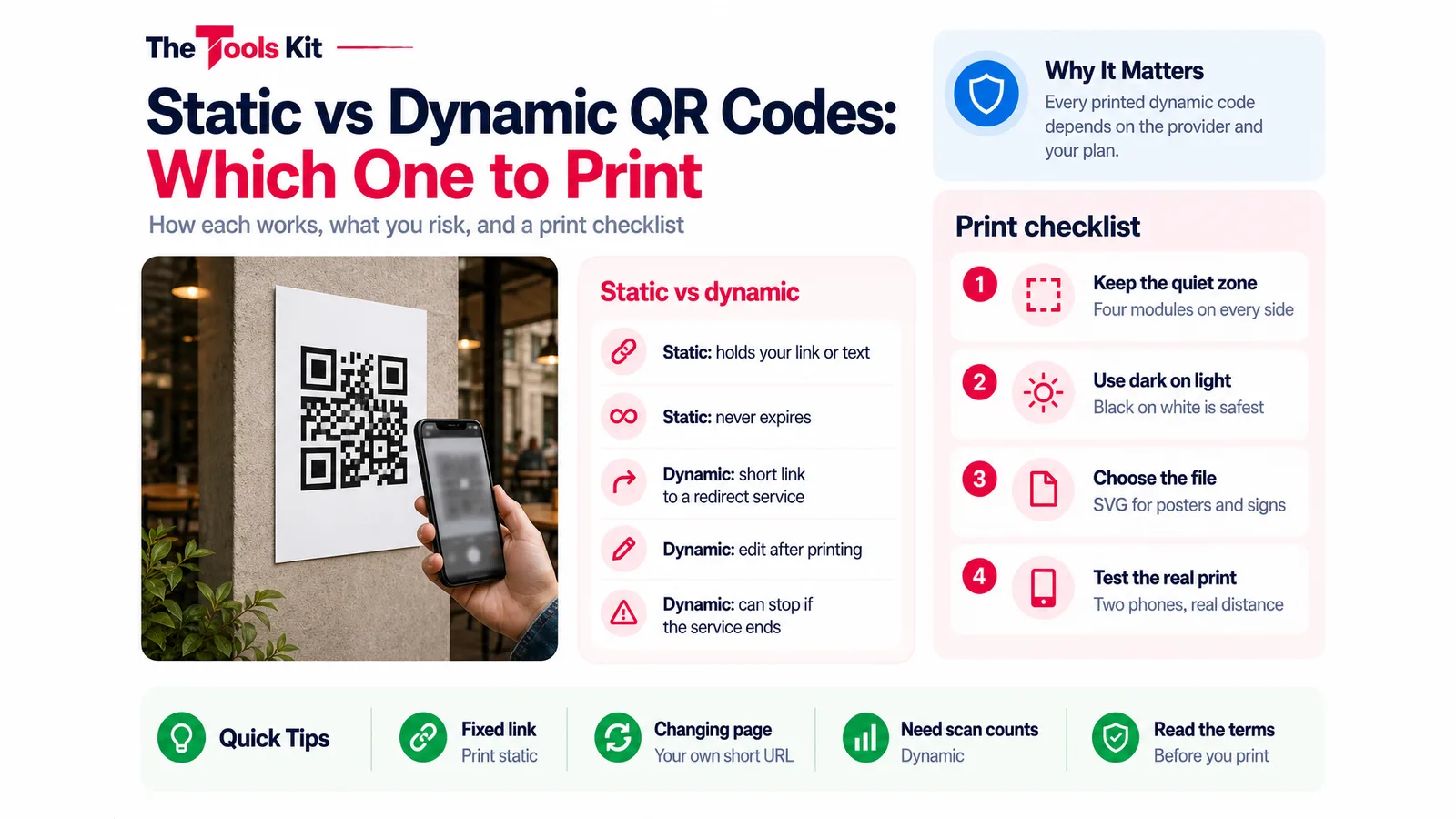
Key takeaways
- A static QR code stores your link or text inside the pattern, so it never expires and keeps working as long as the destination page exists.
- A dynamic QR code stores a short link on a provider's server, which allows editing and scan counts but depends on that provider and your plan.
- A static code pointing to a short redirect on your own domain gives most of the flexibility of a dynamic code without the outside dependency.
- Keep a four-module quiet zone, print dark on light, use SVG for large prints, and test the real print with two phones before the full run.
Print a static QR code when the link will not change, and a dynamic one only when you need to change the destination after printing or count scans. A static code stores your link or text inside the pattern itself, so it keeps working for as long as that link works. A dynamic code stores a short link that belongs to a QR company, and that company's server sends each scan on to your page. If the service or your subscription ends, a dynamic code can stop working on everything you printed.
The free QR Code Generator on this site makes static codes. It draws them in your browser, so the text you type is not sent anywhere, and it saves them as PNG or SVG.
How each type works
A QR code is a grid of dark and light squares that encodes data. With a static code, that data is your actual content: a URL, a Wi-Fi login, a phone number or plain text. Point a phone at it and the phone reads your URL straight from the pattern. No server is involved until the phone opens the page.
A dynamic code encodes a different, shorter URL on the provider's domain. When someone scans it, their phone first visits the provider, which looks up where that code should go today and redirects the visitor. That middle step is what makes editing and scan statistics possible, and it is also the part you depend on.
What you get, and what you risk, with dynamic codes
Dynamic codes are useful in three cases:
- The destination will change. A restaurant menu link that moves each season, or a campaign page that will be replaced.
- You need scan counts. The provider logs each visit to its redirect, so it can report scans by day or location.
- The content is long. A short redirect link makes a less dense pattern than a long URL with tracking parameters, which can be easier to scan at small sizes.
The risk is the dependency. Every printed code relies on that provider staying in business and on your account staying active. What happens when a plan lapses differs by company: some codes keep redirecting, some show a notice page and some stop. Read your provider's terms before you print thousands of labels, and look for wording about what happens to codes after cancellation.
Scans also pass through a third party. The provider sees each scan request, which is how it counts them, so check its privacy terms if that matters for your audience.

A middle path: a static code that points to your own short URL
If you own a website, you can get most of the flexibility of a dynamic code without the dependency. Make a static code for a short address on your own domain, such as yoursite.com/menu, and set that address to redirect to the current page. When the menu moves, you change the redirect on your site, and every printed code follows it. Your own site analytics count the visits.
This works as long as you keep the domain, which you would need anyway for the page the code points to.
Which one to print
| Situation | Better choice |
|---|---|
| Business card, product label, book or packaging with a fixed link | Static |
| Wi-Fi login card, vCard or plain text | Static (these are not links, so there is nothing to redirect) |
| Menu or event page you will update, on your own domain | Static code to your own short URL |
| Campaign where you must report scans and you have no website analytics | Dynamic |
| Thousands of printed items with a long life | Static, or your own short URL |
Print checklist
Whichever type you choose, the print decides whether people can scan it.
- Keep the quiet zone. DENSO WAVE, which invented the QR code, says the code needs a blank margin four modules wide on every side. Our generator adds that margin; do not crop it off or place text or artwork inside it.
- Use dark on light. Black on white is safest. Light codes on a dark background and low-contrast brand colours are where scans fail most.
- Choose the file for the size. A PNG from our tool is at most 500 by 500 pixels, which is about 1.7 inches (4.2 cm) wide at 300 dots per inch. For anything larger, such as a poster or sign, download the SVG, which is a vector file and stays sharp at any size.
- Test the real print. Scan the printed proof with two different phones, from the distance people will actually stand, before you print the full run.
Our generator uses error correction level M, which DENSO WAVE describes as the level most often selected; it lets a code still scan when about 15% of it is damaged or dirty. That is enough for normal printing, but it is not a reason to put a logo over the middle of the code.
Barcodes are a different tool
If what you need is a product or shipping label read by a retail scanner rather than a phone, a QR code is usually the wrong format. The Barcode Generator makes Code 128, EAN-13, UPC-A and other linear barcodes. For a practical QR use at home, see the guide on labelling moving boxes with QR codes.
Sources
Frequently asked questions
No. A static code stores your link or text in the pattern itself, so there is nothing to expire. It keeps working as long as the page it points to exists. If the page moves, the printed code still opens the old address.
Only a dynamic code, or a static code that points to a short URL on your own website that you can redirect. A static code that holds the final link directly cannot be changed once it is printed.
The usual cause is that the subscription or free trial behind it ended, or the provider changed or closed its service. Every scan of a dynamic code passes through the provider's server, so its rules decide what happens. Check your account and the provider's terms.
No. It makes static codes, drawn in your browser so your text is not sent to a server. It does not count scans. Save the code as PNG for small prints or SVG for anything larger.