
Key takeaways
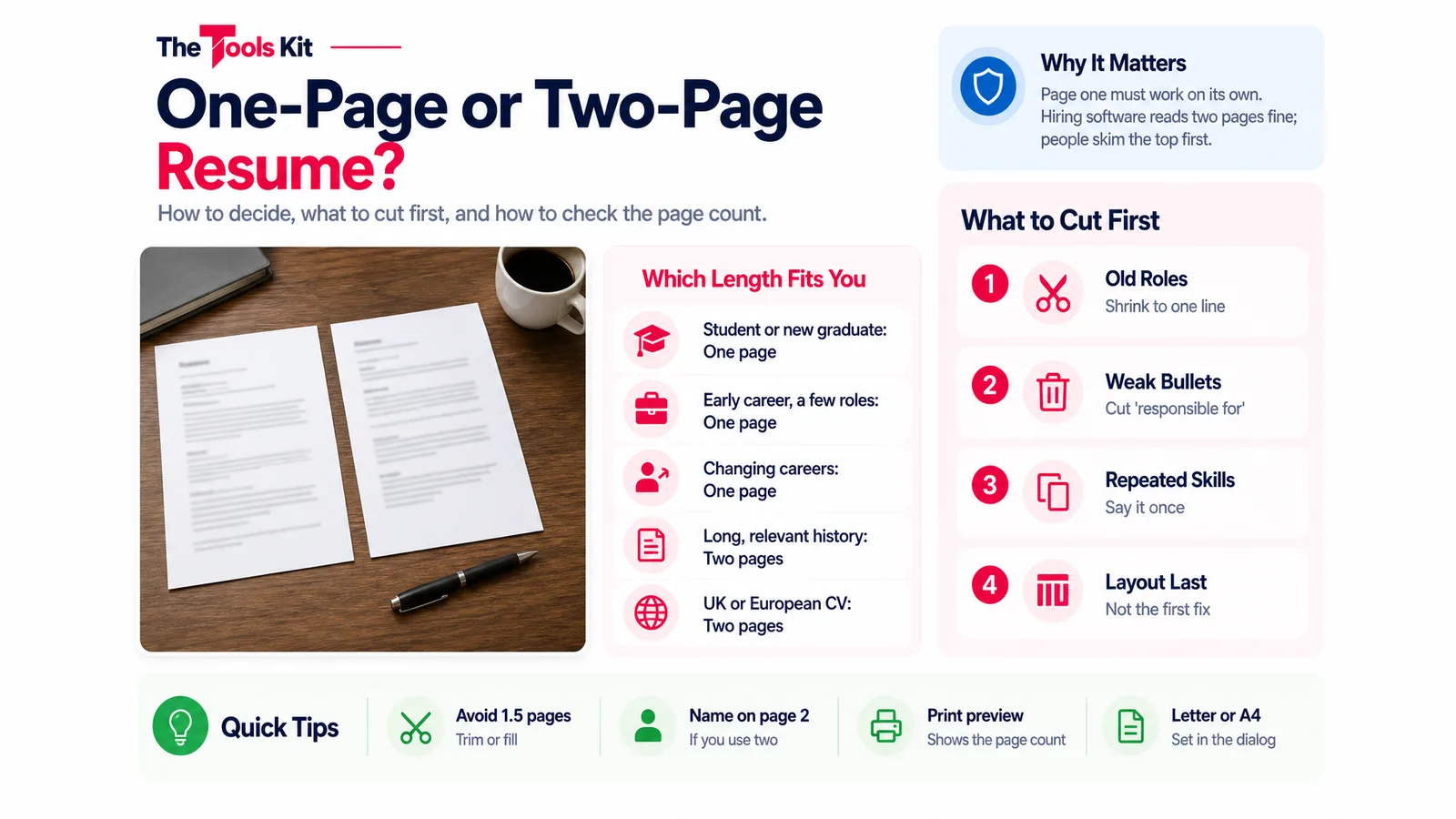
- Use one page as a student, new graduate, early-career applicant or career changer; use two pages when relevant experience genuinely fills both.
- Applicant tracking systems read two-page resumes fine; page count matters to the human reader, so page one must work on its own.
- When you spill over, cut old roles, duty-style bullets, repeated skills and objective statements before touching margins or font size.
- Avoid a page and a half: either trim back to one full page or add relevant material until the second page is properly filled.
Use one page if you are a student, a new graduate, early in your career or changing fields. Use two pages when you have enough relevant experience to fill both with material a hiring manager for this job would want to read. Length is not a rule a resume can break; it is the result of what you include. The real question is whether every line earns its place, and a resume that does that usually lands on one page or two full ones, rarely one and a half.
This guide covers who each length suits, what to cut first when you spill over, and how to check the page count before you save the PDF.
Why the one-page advice exists
A recruiter going through a stack of applications reads the top of the first page first, and may decide from that alone whether to keep reading. The one-page advice is a way of forcing you to put your best material where it will be seen. It is not a filter built into hiring software; applicant tracking systems read a two-page file as easily as a one-page file. If you want to know what those systems do struggle with, our guide to ATS-friendly resume format, fonts and sections covers columns, tables and text that is really an image.
So the honest version of the advice is: page one must work on its own. If a reader stopped at the bottom of it, would they know who you are, what you do, and why you fit this role?
When one page is right
- Students and new graduates. One page holds education, projects, part-time work and skills. If you are short of material rather than space, see how to write a resume with no experience.
- Early career. With a few roles, each one gets three or four strong bullets and the page fills naturally.
- Career changers. Much of your history is less relevant to the new field. One tight page that leads with transferable results reads better than two pages of the old job.

When two pages is right
- A long, relevant history. Several roles in the same field, each with results worth stating, will not fit on one page without cutting things a hiring manager would want to see.
- Senior and technical roles. Leadership scope, projects, certifications and tools can each justify their space when the job asks for them.
- Local norms. In the UK and much of Europe the document is called a CV, and two pages is common and expected. Academic CVs list publications, teaching and grants and run as long as the record does; they are a different document from a job resume.
If you go to two pages, fill most of the second one, put your name on it in case the pages are separated, and keep the strongest material on page one anyway.
What to cut first when you spill over
Work through this list in order and check the page count after each step. Most resumes that run a few lines over come back to one page by step three.
- Old and unrelated roles. Jobs from many years ago, or ones with nothing to do with the target role, can shrink to a single line (title, company, dates) or go entirely.
- Weak bullets. Bullets that describe duties ("responsible for", "helped with") rather than results take space without proving anything. Cut them or rewrite them with a number.
- Repeated skills. If a skill already appears in a bullet as something you did, it does not also need a line in the skills list.
- The objective statement. Replace a paragraph about what you want with a two-line summary of what you offer, or drop it.
- Extras. References available on request, a full street address, hobbies unrelated to the job, and coursework once you have work experience.
- Layout last. Margins, font size and line spacing are the final lever, not the first. Shrinking the text to fit makes the page harder to read, which defeats the point of fitting it.
Check the length before you save the PDF
Paste your resume text into our resume checker. Among its ten checks, it flags a resume under 150 words as too thin and one over 1,000 words as long, with the note that most resumes fit on one to two pages. It also flags vague phrases such as "responsible for", which are usually the first lines worth cutting. For a live count while you edit, the word counter shows words and characters as you type.
Word count is a guide; the page is what counts. In our resume builder, you fill in contact details, a summary, experience, education and skills, pick a Classic, Modern or Minimal template, and press Print / Save as PDF. Your browser's print dialog then shows exactly how many pages the resume will take and where page two starts, before you save anything. The page size follows the paper setting in that dialog, so switch between Letter and A4 there if you are applying in a different country. The builder runs in your browser and nothing you type is uploaded, but nothing is saved between visits either, so save the PDF before you close the page.
The one-and-a-half page problem
A resume that runs a quarter of the way onto page two is the length to avoid. The half-empty page looks unfinished, and the content on it is usually the least important thing on the resume. Either cut it back to one page using the list above, or, if you have relevant material you left out, add it and fill page two properly. Both are better than a stray paragraph and a contact line on their own page.
Frequently asked questions
Yes, when you have enough relevant experience to fill both pages with material the hiring manager would want, which is common for long careers and senior roles, and normal for CVs in the UK and Europe. Keep your strongest material on page one either way.
Yes. Education, projects, part-time work, volunteering and skills fit on one page, and a second page usually means padding. Lead with the section that best matches the job, which for many students is projects or relevant coursework.
No. Applicant tracking systems read a two-page file as easily as a one-page file. They struggle with layout instead: columns, tables, text boxes and text saved as an image. Page count matters to the human reader, not the software.
In the resume builder, press Print / Save as PDF and look at the print preview, which shows the page count and where page two begins. Change the paper size there to Letter or A4 to match the country you are applying in.