
Key takeaways
- EXIF metadata on a phone photo typically includes GPS coordinates accurate to a few metres, the exact timestamp, camera model, and exposure settings.
- Major social platforms generally strip EXIF on upload, but email, file transfer services, forums, marketplace listings, and personal websites preserve it.
- The EXIF Remover redraws the image through a browser canvas on your device, so nothing is uploaded, though JPEGs get slightly recompressed.
- Stripping metadata removes the invisible layer only; house numbers, street signs, or a recognisable window view still identify the location visually.
Every photo your phone takes carries a hidden block of data alongside the picture. It is called EXIF, and on most phones with location services enabled it includes the precise latitude and longitude where the shot was taken.
That is genuinely useful when you are searching your own library by place. It is a problem when the photo leaves your device.
What is actually in there
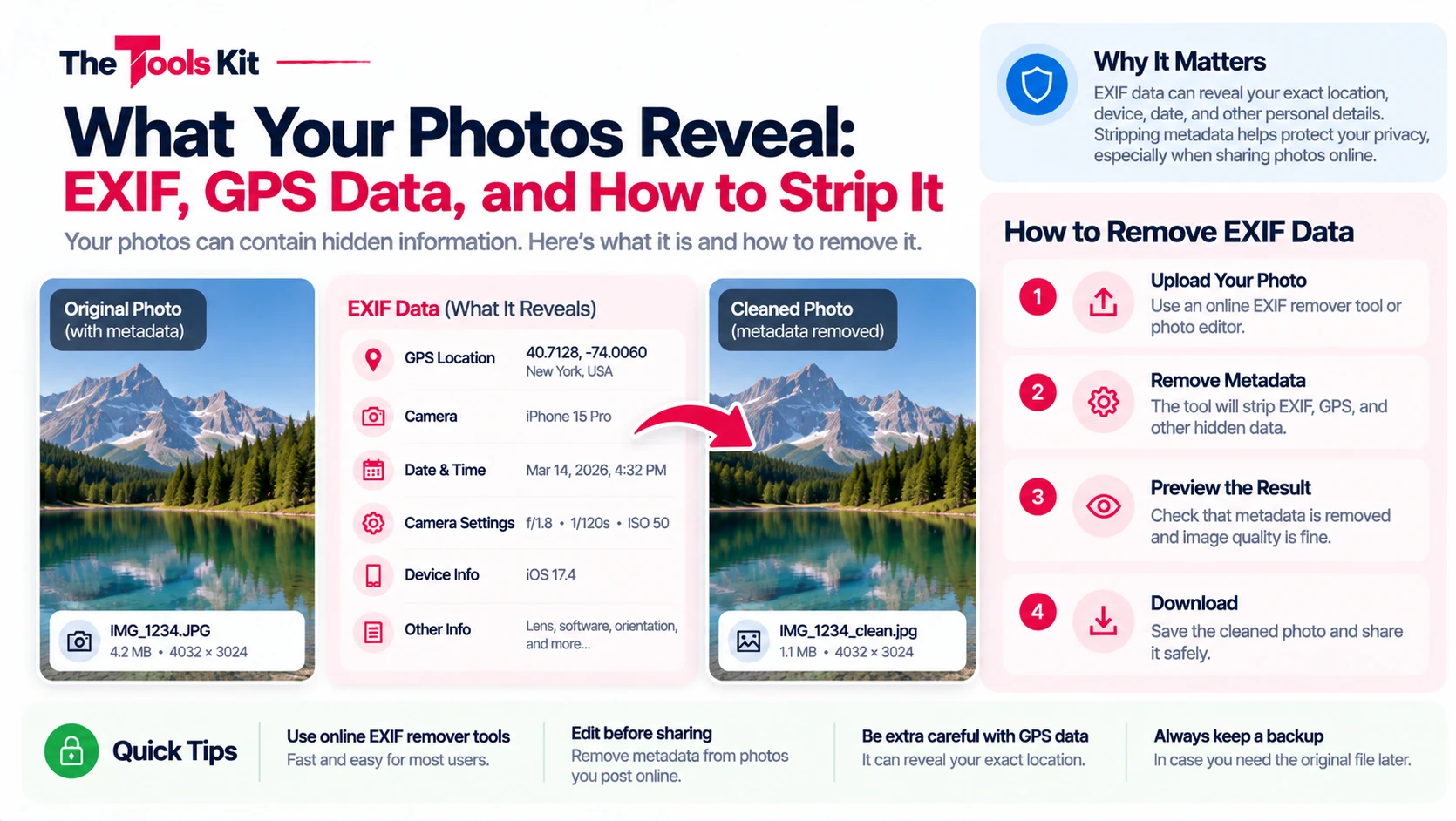
Open the metadata on a typical phone photo and you will usually find:
- GPS coordinates, often accurate to within a few metres, plus altitude
- Date and time, down to the second
- Camera make and model, which identifies your specific phone model
- Exposure settings: aperture, shutter speed, ISO, focal length
- Orientation, which tells viewers how to rotate the image
- Sometimes a thumbnail of the original image, which can survive cropping in some older tools
The exposure data is harmless. The coordinates and timestamps are the ones worth thinking about.
When it leaks and when it does not
This is the part most advice gets wrong by being absolute. Whether EXIF reaches other people depends on the channel:
- Major social platforms generally strip EXIF when they process an upload. Posting to a large social network usually does not publish your coordinates.
- Direct file sharing does not strip anything. Emailing a photo, sending it through a file transfer service, uploading it to a forum, attaching it to a marketplace listing, or putting it on your own website all preserve the original metadata unless something removes it first.
- Messaging apps vary. Some compress and strip, some send the original file untouched, and the behaviour can differ between sending as a photo and sending as a document.
The practical rule: if you did not verify the platform strips it, assume it does not.
Where this actually matters
The realistic risks are mundane rather than dramatic:
- A marketplace listing photographed at home, published with your home coordinates attached
- A photo of a child posted with the coordinates of their school or your house
- A "working from a cafe" picture that pins the cafe, and by pattern your routine
- A photo emailed to a stranger during a rental or sale enquiry
None of these are exotic. They are ordinary sharing, with an extra field nobody thought about.
How to remove it
The EXIF Remover shows you what a photo currently contains, then produces a clean copy with the metadata gone. It works by redrawing the image through a canvas in your browser, which reconstructs the pixels without carrying the metadata block across.
Two things worth knowing about that approach:
- It runs entirely on your device. The photo is never uploaded, which matters, because uploading a file to strip its location data would defeat the purpose.
- It re-encodes the image. For JPEG this means a small amount of recompression. For a photo destined for the web this is unnoticeable. If you need a byte perfect archival original, keep the untouched file and share the cleaned copy.
What stripping does not do
Removing EXIF does not anonymise the picture itself. If the image shows a house number, a street sign, a school uniform, or a recognisable view from a window, the content still identifies the location. Metadata removal handles the invisible layer, not the visible one.
A simple habit
Before a photo goes anywhere outside your own devices, ask one question: does this need to carry where and when it was taken? For holiday pictures shared with family, probably fine. For anything public, or anything going to someone you do not know, strip it first. It takes a few seconds and there is no downside. Metadata is not the only thing worth removing before a photo goes public: Blur Image will pixelate a face or a house number, and Image Compressor shrinks the file for upload.
Frequently asked questions
Not all, but most phone photos do when location services are enabled for the camera. Screenshots, images already processed by some apps, and photos from cameras without GPS typically do not contain coordinates.
Major social platforms generally strip EXIF during upload processing. Direct sharing does not: email attachments, file transfer services, forum uploads, and marketplace listings usually preserve the original metadata. If you have not verified a platform strips it, assume it does not.
Use an EXIF remover, which produces a copy of the image without the metadata block. A browser based tool does this by redrawing the image through a canvas locally, so the photo never leaves your device.
Slightly, for JPEG, because the image is re-encoded during the process. The difference is not visible at normal viewing sizes. If you need a byte perfect original, keep the untouched file and share the cleaned copy.
No. It removes the invisible data layer only. If the picture itself shows a house number, street sign, or recognisable view, the content still reveals the location regardless of metadata.